QuantCAD vs Adam and CADAM
QuantCAD, Adam and CADAM are all based on AI for CAD but in different ways. QuantCAD builds a complete multi-part assembly of B-rep solids from one prompt, in a web browser, with STEP and STL export and no CAD license. Adam is an AI copilot that edits native models inside CAD tools you already use, such as Onshape, Autodesk Fusion and SOLIDWORKS. CADAM is Adam's open-source text-to-CAD web app, which writes OpenSCAD code and exports STL, SCAD and DXF.
Last updated by Brad Bartlet, Senior consultant in research and content for QuantCAD.
When to use each tool
Choose QuantCAD if you want
- A complete assembly from one prompt, with housings, internal parts, fasteners and wiring
- Each assembly checked for interference and fit before you get it
- No CAD software or license to buy or install
- No connection to your CAD files, PDM or PLM systems
- STEP files with every part as a solid, for any CAD tool or supplier
- No CAD or coding experience needed
- Unified credit system where costs scale based on usage type and task complexity
Choose Adam or CADAM if you want
- AI edits inside a CAD tool you already use, such as Onshape, Fusion or SOLIDWORKS
- Changes made in your native models and their feature history
- Help preparing drawings in SOLIDWORKS
- An open-source text-to-CAD app that writes OpenSCAD code, in CADAM
How do QuantCAD, Adam and CADAM compare?
| Aspect | QuantCAD | Adam and CADAM |
|---|---|---|
| Best for | Turning a text prompt into a complete multi-part assembly of editable B-rep solids, in a web browser, with STEP and STL export. | AI edits to native models inside your existing CAD tool (Adam), and parametric OpenSCAD parts in the browser (CADAM). |
| What it is | A text-to-CAD platform in the web browser. | Adam is an AI copilot that works inside CAD tools. CADAM is Adam's open-source text-to-CAD web app. |
| What you need | A web browser. No CAD software or license. | For Adam, your own CAD account or license, such as Onshape, Fusion or SOLIDWORKS. CADAM runs in the browser. |
| What it can access | Only your prompts and the models it builds for you. Nothing to install, and no connection to your computer, CAD files or PDM and PLM systems. | Adam works through the accounts and workstations you connect, such as Onshape documents, a running SOLIDWORKS session or Arena PLM, with the same access as those accounts. |
| How you build | Describe the part or product in plain language. Build auto mode builds the whole product in one action; Build manual mode builds it one milestone at a time. | In Adam, describe an edit or a new feature, using selected geometry as context. In CADAM, describe a part or upload an image, then adjust it with sliders. |
| Geometry | B-rep solids on the Open CASCADE kernel. | Adam: native features in your CAD tool. CADAM: OpenSCAD code, compiled in the browser. |
| Assemblies | Yes. One prompt can produce a complete assembly with housings, internal parts, fasteners and wiring. Our published examples have 36 and 46 parts. | Adam works with the parts and assemblies in your CAD tool. |
| Checks before you get the result | The assembly is checked for interference between parts, floating or unseated parts, gaps between mating parts and parts outside the housing. Parts that fail are reworked in the same run. | In Adam, you review the resulting features and regenerate the model in your CAD tool. |
| Exports | STEP AP242, in millimetres, with every part as a solid. STL in Draft, Normal or High quality. | Adam: whatever your CAD tool exports. CADAM: STL, SCAD and DXF. |
| Where it runs | Any modern web browser on a computer, tablet or phone. Nothing to install. | Adam: a web app, an Onshape extension, a Fusion add-in for Windows or macOS, and a Windows connector for SOLIDWORKS. CADAM: a web browser. |
| Skills needed | No CAD or coding experience. | Adam is aimed at engineers who already model in a CAD tool. CADAM needs no CAD skills. |
| Free plan | 120 credits at signup and 100 every month, on the same AI models as the paid plans. Includes Build auto mode and STEP and STL exports. | Adam: a light daily quota on a lite model. CADAM's code is open source. |
| Paid plans | Pro $29 a month, or $26 a month billed yearly. Business $59 a month, or $54 a month billed yearly. VAT included. | Pro $40 a month with a 7-day free trial, Max $200 a month and Team $250 per seat a month. |
| Limits | No 2D drawings or GD&T. Changes are made by prompt, not by sketch. Free-plan models may appear in the public catalog. | Adam needs a CAD tool and license you already have. CADAM's export list does not include STEP. |
Adam and CADAM facts come from Adam's own website and documentation and CADAM's GitHub page, checked Nov 20, 2026: Adam home page, Adam pricing, Adam Copilot, Adam for Onshape, Adam for Autodesk Fusion, Adam for SOLIDWORKS, Adam integrations, Adam and Arena PLM, CADAM, CADAM on GitHub. This page compares documented features and published prices, not the quality of each tool's output. Prices and plan allowances can change, so check Adam's pricing page for current numbers. QuantCAD credit use is dynamic and depends on the complexity and type of each prompt. QuantCAD is not affiliated with Adam.
What do you get at each price?
| Plan level | QuantCAD | Adam and CADAM |
|---|---|---|
| Free | $0. 120 credits at signup and 100 every month, on the same AI models as the paid plans, with Build auto mode and STEP and STL exports. | $0. A light daily quota on a lite model. CADAM's code is open source. |
| First paid plan | Pro: $29 a month, or $26 a month billed yearly. 1,000 credits a month for building complete assemblies, plus private projects and the Max reasoning level. | Pro: $40 a month, with a 7-day free trial and stronger models. |
| Higher plan | Business: $59 a month, or $54 a month billed yearly. 2,000 credits a month for more and larger assemblies, with the highest usage limits and premium support. | Max: $200 a month, with more usage than Pro. |
QuantCAD prices include VAT. Adam's plans need a CAD tool and license you already have; QuantCAD needs only a web browser.
Text to assembly: a complete product from one prompt
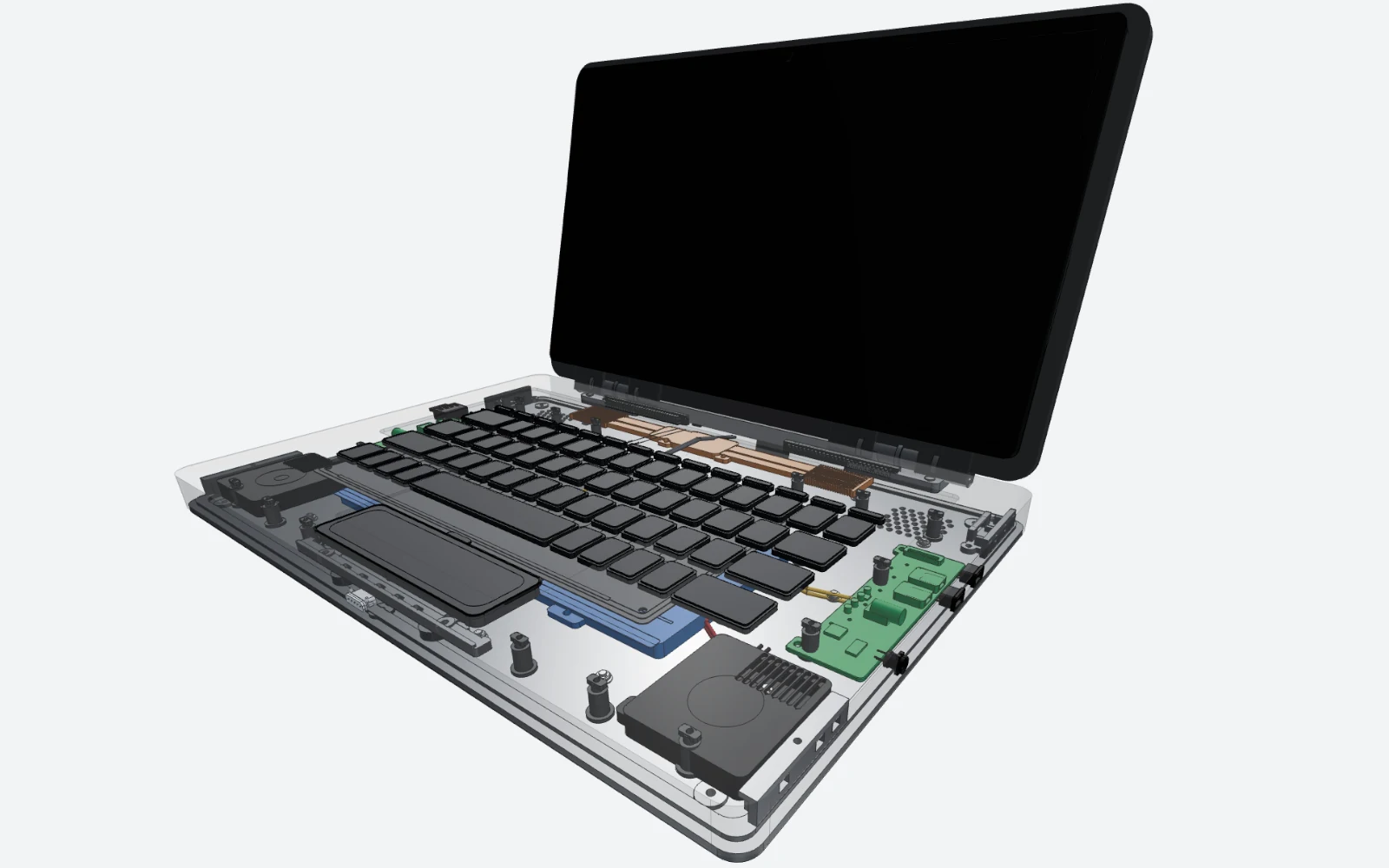
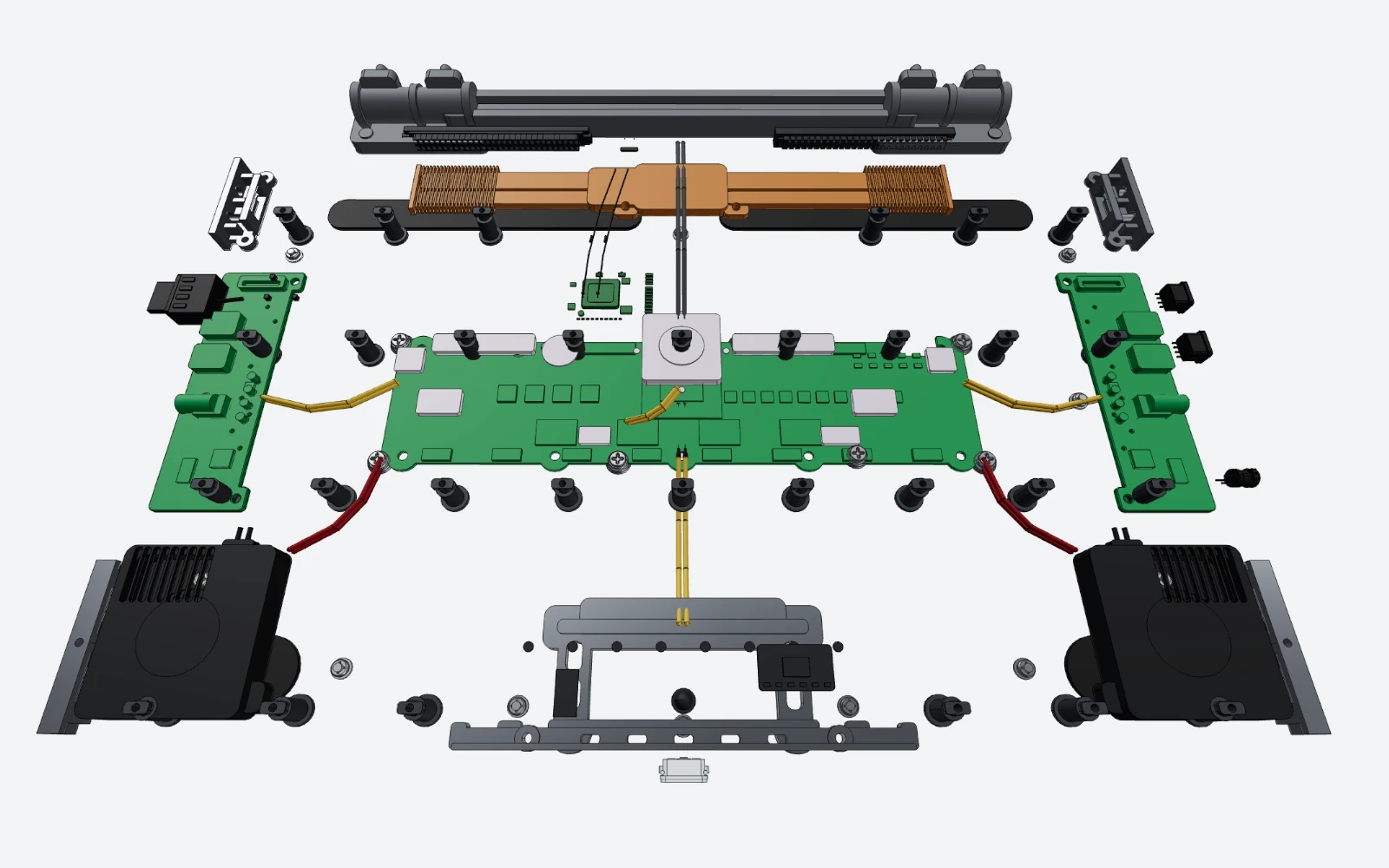
In Build auto mode, you describe the whole product once. Build auto mode turns one prompt into a complete multi-part assembly of B-rep solids, including housings, internal parts, fasteners and wiring. It plans the parts and how they fit together, builds each part, then checks the entire assembly for interference between parts, floating or unseated parts, gaps between mating parts and parts outside the housing, and reworks the parts that fail. It all runs together in one action.
Our published examples include a wheel bolt built as 1 solid in 42 seconds, a 36-part smartwatch in 13 minutes 48 seconds and a 46-part 15-inch laptop in 14 minutes 34 seconds, each from one prompt. The STEP and STL files are in the Build auto mode worked examples, so you can open the solids in your own CAD tool.
A standalone tool or a copilot in your CAD software?
Adam works on models that live in your CAD tool. You connect your Onshape account, or install the Fusion add-in or the SOLIDWORKS connector, and Adam edits the features of a model you already have. You need that CAD tool and its license; Adam's Onshape guide says Adam does not include an Onshape license.
QuantCAD is the CAD tool. You open it in a browser, describe what you want and get the finished model, with nothing else to buy or install. When you are done, download the STEP file and open it in Onshape, Fusion, SOLIDWORKS or any other CAD tool to add drawings and detail.
What can each tool access: your CAD files, PDM and PLM?
To work inside your CAD tool, Adam needs access to it. With Onshape, Adam works with the documents your connected account can access. For Fusion, you install Adam Desktop and an add-in. For SOLIDWORKS, NX, Inventor, CATIA and Solid Edge, you pair a Windows workstation, and Adam works in the CAD session running on it. With Arena PLM, Adam's guide says Adam “has the same Arena access as the account you connect”, covering items, bills of materials, suppliers, files and changes.
Adam's SOLIDWORKS page gives this advice: “Connecting a local CAD application does not make the AI service fully local. Review Adam's security information and discuss your organization's data requirements before connecting sensitive work.”
QuantCAD does not connect to anything you already have. There is nothing to install, and it has no access to your computer, your CAD files, your CAD accounts or your PDM and PLM systems. It only sees your prompts and the models it builds for you. Your account and project data are stored in the EU, and data is encrypted in transit and at rest. Your designs are never used to train or fine-tune AI models, on any plan. Read more in our Privacy Policy.
STEP files and B-rep solids, compared with CADAM's exports
CADAM writes OpenSCAD code from your prompt and lists STL, SCAD and DXF as its exports. STL is a triangle mesh: it suits a 3D printer, but a round hole is a ring of flat faces rather than a true cylinder.
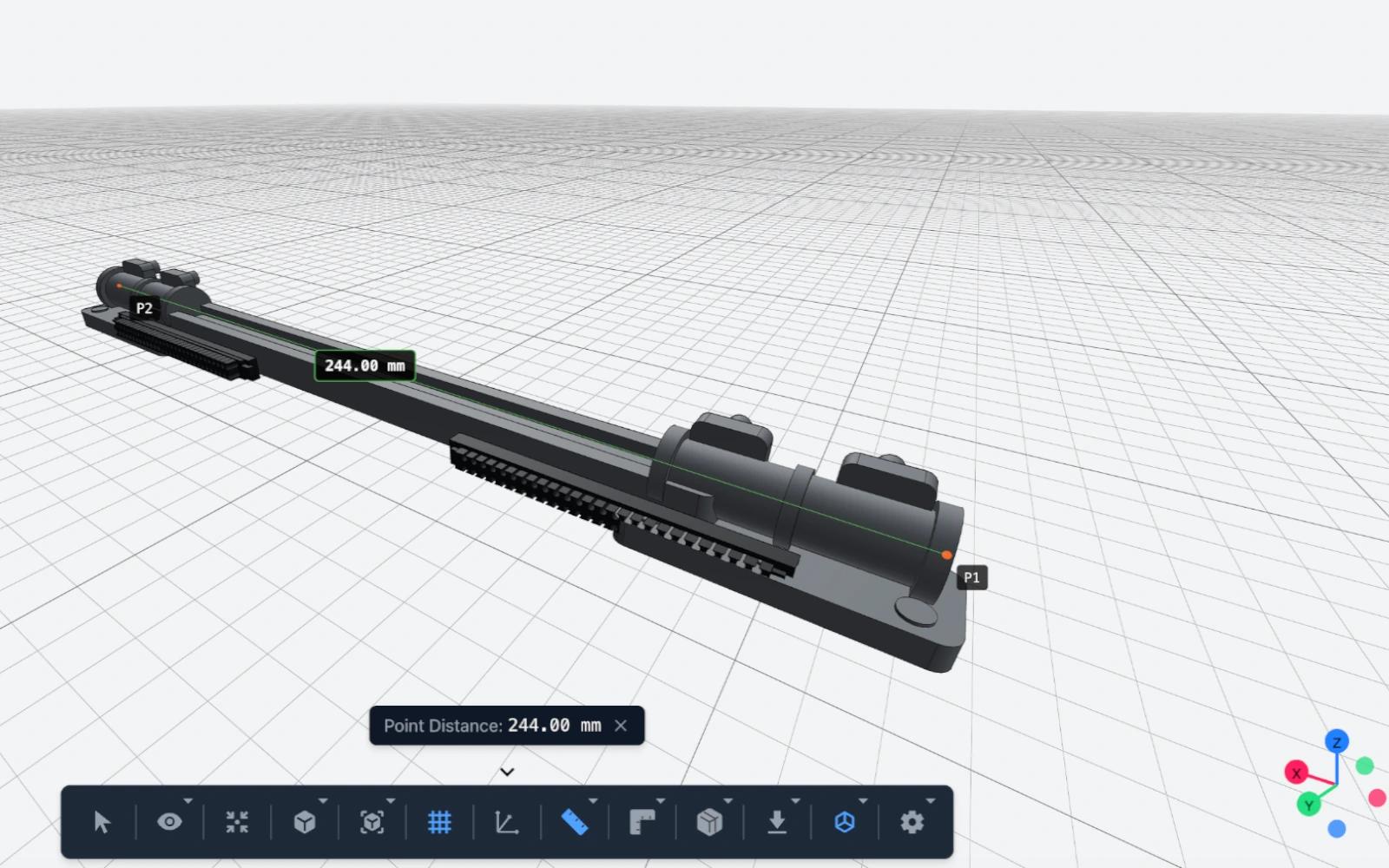
QuantCAD builds every part as a B-rep solid on the Open CASCADE kernel and exports STEP (AP242, in millimetres), which opens as solids in SolidWorks, Fusion, Onshape, FreeCAD, Inventor, CATIA and NX. There you can measure, fillet, cut and dimension the parts. In the QuantCAD 3D viewer you can measure distances, angles and lengths, cut the model with clipping planes and see inside with X-ray mode. More on the difference is in Text-to-CAD vs text-to-mesh.
Start free in under two minutes, with every core feature
Sign up and start your first build in under two minutes, with no credit card and nothing to install. The Free plan gives you 120 credits at signup and 100 every month, on the same AI models as the paid plans, and includes every core feature: Build auto and manual mode, the 3D viewer, revisions and the product dashboard.
- STEP and STL exports are never limited, watermarked or charged.
- Every plan, including Free, allows commercial use of what you make.
- Pro and Business add more monthly credits, private projects and the Max reasoning level.
- On the Free plan, your models and project names may appear in our public catalog. Paid plans keep every project private.
Which should you choose?
QuantCAD is best for turning a text prompt into a complete multi-part assembly of editable B-rep solids, in a web browser, with STEP and STL export. Choose it when you want a finished, checked assembly from a description, without CAD software or CAD experience. Choose Adam when you already model in Onshape, Fusion or SOLIDWORKS and want AI edits inside those native files.
Frequently asked questions
What is the difference between QuantCAD and Adam?
QuantCAD turns one text prompt into a complete multi-part assembly of B-rep solids, checks it for interference and fit, and runs in a web browser with no CAD software or license. Adam is an AI copilot that edits native models inside CAD tools you already use, such as Onshape, Autodesk Fusion and SOLIDWORKS. CADAM, Adam's open-source web app, writes OpenSCAD code from a prompt.
Is QuantCAD a good alternative to Adam or CADAM?
Yes, if you want a finished assembly from a description without owning CAD software. QuantCAD needs only a browser, includes Build auto mode on the Free plan and exports STEP with every part as a solid. If you already model in Onshape, Fusion or SOLIDWORKS and want AI edits inside those files, Adam is the better fit.
Do I need a CAD license to use QuantCAD or Adam?
Not for QuantCAD: it runs in a web browser and builds the model itself. Adam works through your own CAD tools. Its Onshape guide says you need your own Onshape account, and that Adam does not include an Onshape license.
Does QuantCAD need access to my CAD files or my PDM and PLM systems?
No. QuantCAD only sees your prompts and the models it builds for you, and nothing is installed on your computer. Your designs are never used to train or fine-tune AI models. Adam works through the CAD and PLM accounts you connect: its Arena guide says Adam has the same access as the account you connect, including items, bills of materials, suppliers, files and changes.
Does CADAM export STEP files?
CADAM's GitHub page lists STL, SCAD and DXF exports. STEP is not on that list. QuantCAD exports STEP (AP242, in millimetres) with every part as a B-rep solid, plus STL.
Can I turn text into a CAD assembly?
Yes. In QuantCAD, describe the whole product in one prompt and choose Build auto mode. Build auto mode turns one prompt into a complete multi-part assembly of B-rep solids, including housings, internal parts, fasteners and wiring. It plans the parts and how they fit together, builds each part, then checks the entire assembly for interference between parts, floating or unseated parts, gaps between mating parts and parts outside the housing, and reworks the parts that fail. It all runs together in one action. You then download a STEP file with every part as a solid.
Can beginners and non-coders make CAD assemblies?
Yes. QuantCAD needs no CAD or coding experience and no CAD software: you describe the product in plain language and review the result in a 3D viewer.
Are the exported models editable?
Yes. QuantCAD's STEP file opens as solids in SolidWorks, Fusion, Onshape, FreeCAD, Inventor, CATIA and NX, where you can measure, fillet, cut and dimension them. Like any STEP file, it carries the geometry, not the feature history. In QuantCAD you change the model by describing the change, and each change is saved as a revision.
Can I use the models commercially, and are exports limited?
In QuantCAD, every plan, including Free, allows commercial use with no watermarks, and STEP and STL exports are never limited or charged.
How fast can I start?
QuantCAD runs in the browser: sign up and start a first build in under two minutes, with no credit card and nothing to install.
Related comparisons and guides
The 9 best AI CAD tools in 2026
Nine AI CAD tools compared on output, exports, assemblies, free plans and price.
QuantCAD vs Zoo Design Studio
Complete assemblies from one prompt compared with a CAD app and its AI agent.
QuantCAD vs BuildCAD AI
Complete assemblies compared with parametric 3D-printable parts.
AI CAD for beginners
A complete 3D CAD model from one prompt, with no CAD training or coding.
Build auto mode guide
How one prompt becomes a checked assembly, with worked examples and STEP files to download.
Text-to-CAD vs text-to-mesh
Why B-rep solids, not triangle meshes, are what you can edit and manufacture.